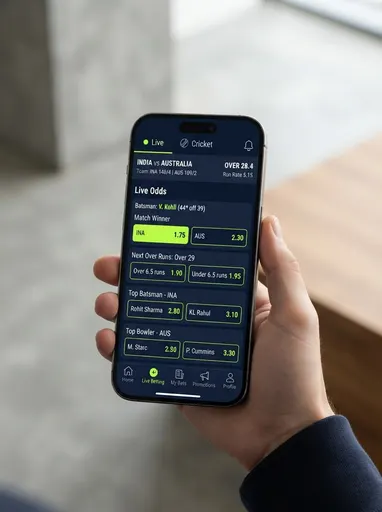
PlayExch is a cricket exchange designed for a phone screen: large tap targets, a ladder that fits one thumb, and pages light enough to load on weak data. The desk opens your PlayExch ID on WhatsApp. Message, deposit by UPI, and the login link, username and password come back in the chat. You need WhatsApp, a UPI app and a bank account in your own name. There is no PlayExch app to install and no form to fill.
Below are the PlayExch login on Android and iPhone and the fixes when it fails, deposits and withdrawals from the handset, how PlayExch compares with Fastwin and SkyinPlay, and the checks that prove the ID is real. Real money, adults of 18 and over, and an always-in-your-pocket platform is the strongest case for a loss limit set in advance.
Why PlayExch
What Makes PlayExch Feel Like an App
Fast PlayExch ID activation
Activated quickly after you message us on WhatsApp.
Fast, app-like exchange interface
Sharp, real-time odds on every market and session.
Fast UPI deposit & withdrawal
Fast UPI & bank payouts with zero hidden charges.
Live casino + all sports
A real team on WhatsApp whenever you need help.
Login and App
PlayExch Login: an App-Like Site, Not an APK
PlayExch runs in the browser, and on a phone it is hard to tell from an installed app once you add it to your home screen from Chrome or Safari. The link, username and case-sensitive password from the chat are all you need. There is no PlayExch app in either store and the desk never sends an APK. A "PlayExch APK" offered in a group or an ad is somebody else's program, and sideloaded APKs are how phones pick up SMS-reading malware.
The session usually stays signed in on a phone, so a lock screen on the handset is part of keeping the account yours. If the login is refused, type the password rather than paste it, and open the link in Chrome instead of WhatsApp's own browser. If a page hangs mid-market on weak signal, reload; a bet placed before the drop settles on the server. If none of that helps, send the desk a screenshot and we reset the password from the panel. Change the issued password on first login.
Deposits and Withdrawals
Depositing and Withdrawing From the Same Handset
Deposits are UPI, which on a phone means switching to Google Pay, PhonePe or Paytm and back. Send the amount and your PlayExch ID, the desk confirms the payment details in the chat, you pay and send the screenshot. The balance shows on the panel once matched, usually within minutes outside peak overs. Details are confirmed fresh every time; a reused screenshot is the main way a deposit reaches the wrong person.
Withdrawals go only to a bank account in your own name. Send the amount and the account, the desk checks the panel and pays, normally the same day. No release fee, no verification deposit, no tax. The minimum deposit changes with the panel, so ask in the chat before paying, and keep a first deposit small while the platform is new to you.
Compare
PlayExch Compared With Fastwin and SkyinPlay
Fastwin is the quick-play platform: instant-result games first, cricket second, for a player who wants rounds settled in seconds. SkyinPlay is the in-play specialist with higher market limits and a ladder that rewards a laptop, for a player who trades big in-play positions.
PlayExch is the one when you bet cricket on a phone and want an exchange built for that screen rather than shrunk to fit it. If you want quick games, Fastwin; if you want high limits and a big ladder, SkyinPlay. The desk opens all three and will say which suits if you describe how and where you bet.
Safety
Checking a PlayExch ID From Your Phone
The real PlayExch ID logs in at the link from the chat, shows zero until the deposit is matched, and pays a withdrawal to your own bank with nothing deducted. A clone fails at the payout with a "release fee". Make a small withdrawal in your first days and you have the proof before anything much is at stake. Reach the site from your home-screen shortcut, never from a forwarded link.
The desk never asks for an OTP, UPI PIN or password, never charges to open or activate an ID, and never posts numbers in groups; the buttons on this site are the only route into the chat. The anti-fraud policy lists the tricks and the first-hour steps if money has gone.
PlayExch is for adults of 18 and over, where state rules permit. A platform that lives in your pocket makes it easy to bet in every gap of the day; the desk sets deposit limits, loss limits and cooling-off breaks on request, as the responsible gaming page explains.
Simple Process
PlayExch ID From Your Handset
1
Tap, then type "PlayExch ID"
Any button here opens the WhatsApp chat. If you are on patchy data, say so and the desk keeps messages short.
2
Deposit by UPI
The desk confirms payment details in the chat; switch to your UPI app, pay, come back and send the screenshot. The account is created while the deposit is matched.
3
Open the link, add to home screen
Login details arrive in the chat. Open the link in Chrome or Safari, change the password, and add the site to your home screen so you never use a forwarded link.
People search dozens of cricket ID and betting brand names wondering if each is safe or a scam. A name tells you nothing on its own — here are three simple checks that expose a fake site fast, whichever one you are looking at.
A full walkthrough of how money moves in and out of a cricket ID — UPI vs IMPS vs net banking, withdrawal timelines, fees, records, security, and fixing a stuck payment.
Back, lay, session, liability, commission, green book — the vocabulary of a cricket betting screen, explained simply and grouped by theme, so you always know exactly what you are looking at.